Jobber vs Housecall Pro for Painting and Refinishing Contractors
The short answer: I have run my cabinet refinishing business on Jobber for a few years and would recommend it to painters and refinishers who quote with options, take deposits and want customers to pay from a text. I have not used Housecall Pro; its own help center shows it covers the same core features, so test it with one real job before you choose.
I run a cabinet refinishing business, and I have used Jobber day to day for a few years. So the Jobber half of this comparison comes from running real jobs through it.
I have not used Housecall Pro. That section is a researched summary of what Housecall Pro publishes about itself, and I label it that way so you know the difference.
Which is better for painters, Jobber or Housecall Pro?
- Jobber (I use it): I would absolutely recommend it. If your business looks like mine, with quotes that have options, deposits up front, and books in QuickBooks, it covers all of that.
- Housecall Pro (researched, not used): worth a look if built-in marketing and customer-communication tools matter more to you than quoting.
- Try before you commit. Run one real estimate-to-invoice cycle in a free trial before paying for a year.
What does a painting or refinishing business need from job software?
Field service management (FSM) software is an app for businesses that do work at customers' homes. It handles the path from quote to scheduled job to invoice to payment, usually with a customer-facing portal and accounting sync. Jobber and Housecall Pro are both FSM tools.
Most comparison articles are written for plumbers and HVAC. A painting or refinishing business is different:
- Estimates are the job. You may quote a kitchen three ways (paint only, paint plus new hardware, paint plus repairs). Good-better-best options and easy revisions matter.
- Jobs run multiple days. Prep, prime, coats, cure and reinstall can span a week, so multi-day scheduling matters.
- Deposits are normal. Collecting a deposit at approval protects you on materials.
- Getting paid should be easy for the customer. The fewer steps between “job done” and “paid”, the better.
What is Jobber like to use day to day? (first-hand)
I am on Jobber’s Pro plan and use it every day. Here is what I actually rely on.
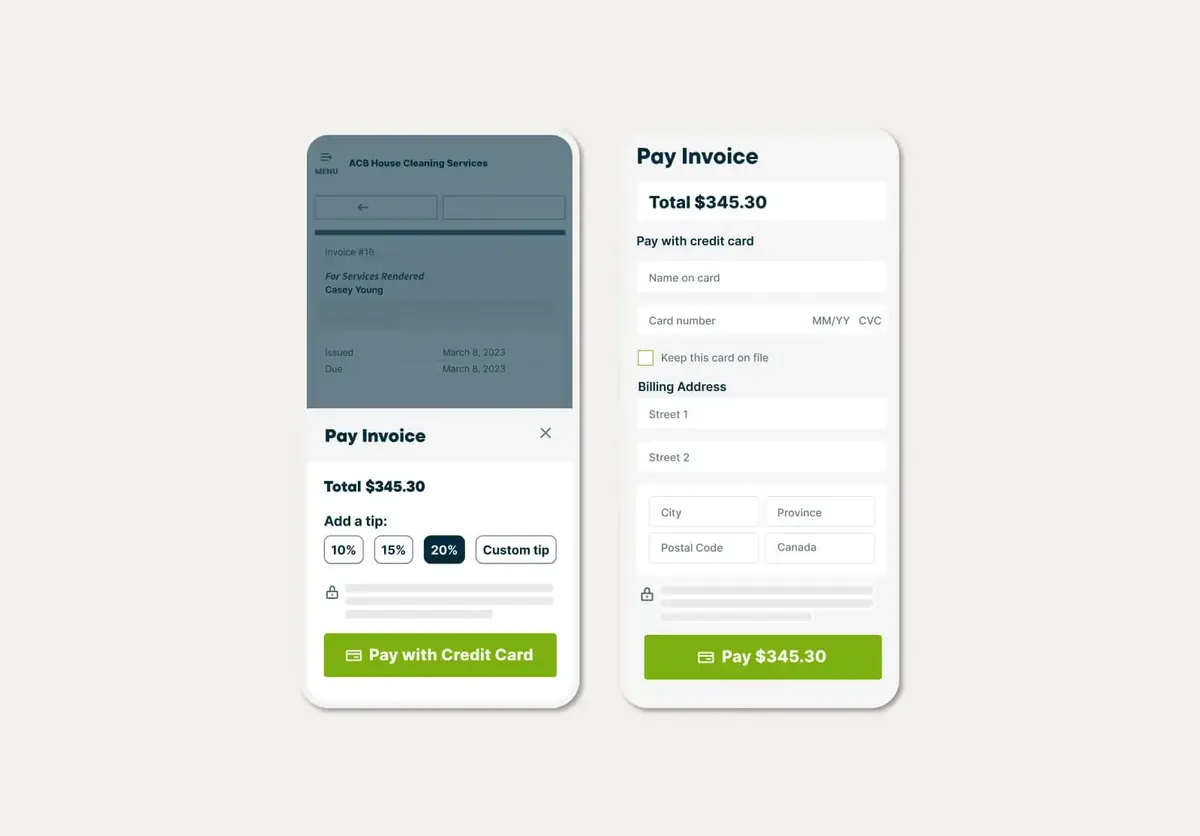
Customers pay straight from a text. This is my favorite feature. The customer gets the invoice by text message, opens it, and pays right there. It is a great way to get paid without chasing anyone.
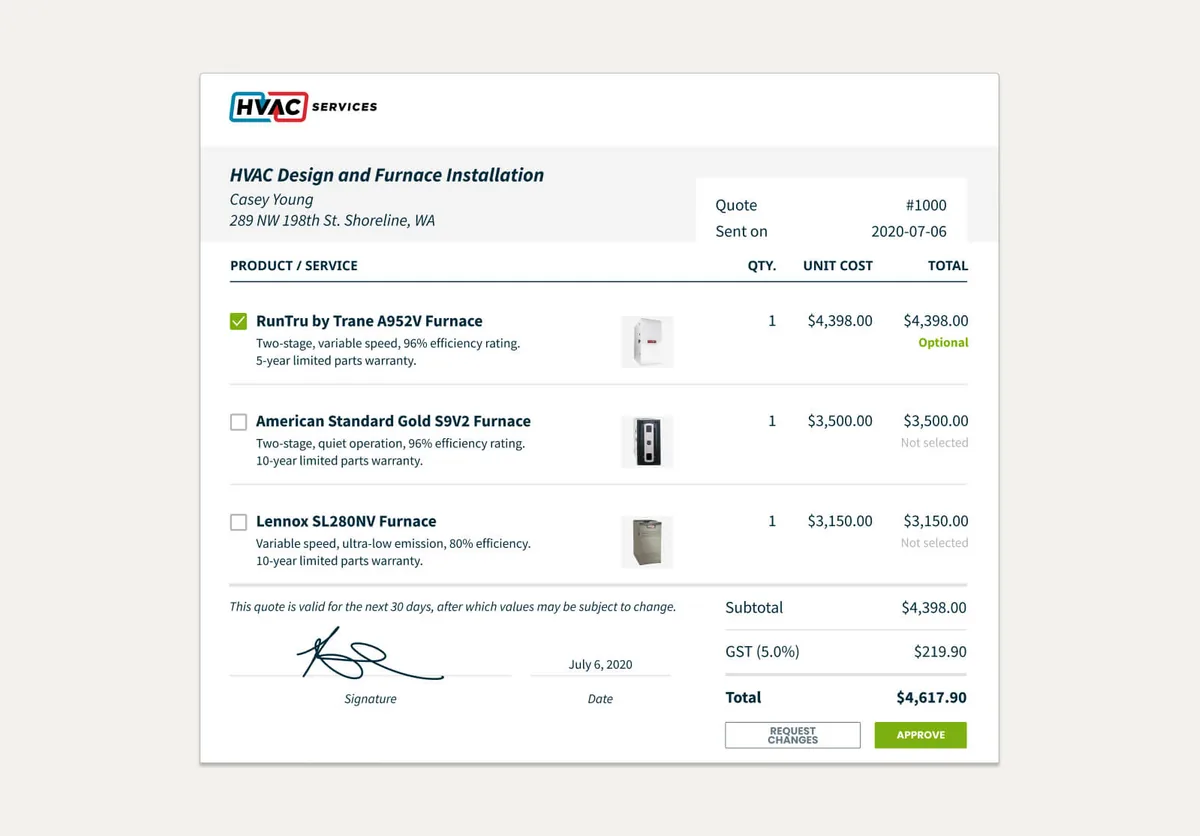
Quote options. I use optional line items and multiple options on my quotes, which fits how cabinet jobs get priced: the customer can see the choices and pick.
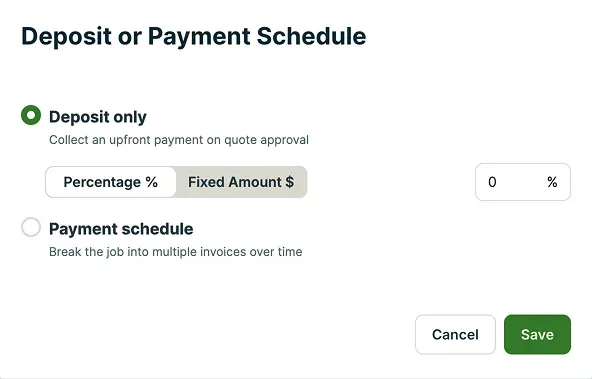
Deposits through Jobber. I collect deposits through Jobber instead of handling them separately. Jobber lets you set the required deposit as a percentage or a fixed amount.
QuickBooks connection. My Jobber account is connected to QuickBooks, so the bookkeeping side is not a second job. Jobber’s help center describes the QuickBooks Online sync as one-way, from Jobber into QuickBooks.
Plan check: Jobber’s help center says optional line items on quotes and the QuickBooks Online integration are each available on select plans, so confirm the plan you are looking at includes them.
Which Jobber plan has the features painters use?
Jobber’s pricing page (checked October 30, 2026) lists four main plans, each including everything in the plan before it. Here is where the features from this guide show up:
| Feature painters and refinishers use | Lowest Jobber plan that lists it |
|---|---|
| Quotes, invoices and online card payments | Core |
| QuickBooks Online sync | Connect |
| Automated quote and invoice follow-ups | Connect |
| Optional line items (upsells) on quotes | Grow |
| Two-way text messaging with customers | Grow |
| Job costing | Grow |
Jobber’s 14-day free trial runs on the Grow plan with no credit card, according to the same page, so you can try every feature in this table before choosing. Plan names and features change, so check the Jobber pricing page before you buy.
Would I recommend Jobber?
Absolutely. If you quote jobs with options, take deposits, and want customers to be able to pay the minute they get the invoice, Jobber does that well in my experience.
Jobber’s partner terms at the time of writing say customers who sign up through a partner link get 20% off Jobber’s pricing for their first six months, unless the partner dashboard sets different terms. Check the current offer when you sign up.
Try Jobber (paid link)
What does Housecall Pro offer? (researched, not used)
I have not used Housecall Pro, so nothing here is a first-hand opinion. Based on its website and help center, Housecall Pro covers the same core workflow (estimates, scheduling, invoicing, payments) and puts more emphasis on customer communication and marketing tools. It is available in the US and Canada.
Here is what its help center documents for the four things painters care about most (checked October 29, 2026):
- Options on estimates: multi-option estimates (for example Good, Better, Best), where each option has its own line items, pricing and attachments and the customer picks one to approve.
- Deposits: you can require a flat amount or a percentage of the estimate, up to 100%, which the customer pays before they can approve.
- Pay from a text: invoices can be sent by text with a secure link the customer opens on their phone to pay online. This requires Housecall Pro Payments and an approved texting number.
- QuickBooks Online: the sync typically runs one way, from Housecall Pro into QuickBooks Online, when jobs are finished, invoiced or paid. Estimates do not sync.
If you are leaning toward Housecall Pro, use its free trial to run one real job through it before you commit.
See Housecall Pro (paid link)
How do Jobber and Housecall Pro compare side by side?
| What you need | Jobber (I use it) | Housecall Pro (researched) |
|---|---|---|
| Quotes with optional line items / multiple options | Yes, I use them (select plans) | Yes, multi-option estimates (per help center) |
| Deposits | Yes, I collect them through Jobber | Yes, flat or percentage, up to 100% (per help center) |
| Customer pays invoice from a text message | Yes, my favorite feature | Yes, with Housecall Pro Payments and a texting number (per help center) |
| QuickBooks connection | Yes, I have it connected; one-way to QuickBooks Online (select plans) | Yes, typically one-way to QuickBooks Online; estimates do not sync (per help center) |
| Scheduling | Yes (per vendor site) | Yes (per vendor site) |
| Pricing | See current pricing page | See current pricing page |
Housecall Pro cells come from its help center (see Sources) and have not been tested first-hand.
How can you decide in one week?
- List your last 10 jobs: how many quotes did you send, and how many had options or revisions?
- Start a free trial of your top pick and build your real quote template.
- Run one actual job through it, from quote to paid invoice.
- If anything felt clumsy, try the other one with the same job.
The bottom line
Both tools will replace the notebook. I can vouch for Jobber from a few years of running my refinishing business on it, and I would absolutely recommend it. Housecall Pro I can only describe from research, so test it with a real job before you pay for a year.
New to cabinet work, or training a crew? Our step-by-step guide on how to paint kitchen cabinets is the process we follow on real jobs.
Disclosure: SheenWise earns a commission if you sign up for Jobber or Housecall Pro through the links above. This does not change my recommendation, and you pay nothing extra.
Frequently asked questions
Is Jobber or Housecall Pro better for painters?
I can only speak first-hand about Jobber, which I have used day to day for a few years in my cabinet refinishing business and would recommend. Housecall Pro documents the same core features painters need. Run one real job through a free trial of each before you pay for a year.
Can customers pay a Jobber invoice from a text message?
Yes. In my business the customer gets the invoice by text, opens it on their phone and pays by card right there. It is my favorite Jobber feature.
Can you collect a deposit when a customer approves a quote?
Yes in both. I collect deposits through Jobber, which lets you require a deposit as a percentage or a fixed amount. Housecall Pro's help center says it can require a flat or percentage deposit, up to 100%, before the customer can approve an estimate.
Do Jobber and Housecall Pro work with QuickBooks?
Yes. My Jobber account is connected to QuickBooks. Jobber's help center describes the QuickBooks Online sync as one-way from Jobber to QuickBooks and available on select plans. Housecall Pro's help center describes its QuickBooks Online sync as typically one-way from Housecall Pro to QuickBooks, and says estimates do not sync.
Can you give customers good, better and best options on a quote?
Yes. I use optional line items and multiple options on my Jobber quotes. Housecall Pro's help center describes multi-option estimates where each option has its own line items and pricing and the customer picks one.
Does Jobber have a free trial?
Yes. Jobber's pricing page says the free trial lasts 14 days, gives full access to the features on the Grow plan, and needs no credit card. That is enough time to build your real quote template and run one painting or refinishing job from quote to paid invoice before you pick a plan.
Have you used Housecall Pro?
No. Everything about Housecall Pro on this page comes from its website and help center, and it is labeled as researched.
Sources
- Optional Line Items on Quotes, Jobber Help Center
- Deposits on Quotes, Jobber Help Center
- How Items Sync Between Jobber and QuickBooks Online: NEW QuickBooks Integration, Jobber Help Center
- Jobber Pricing (plans, features and free trial FAQ), Jobber
- What's New in Estimates (multi-option estimates), Housecall Pro Help Center
- Collect Deposits on Estimates, Housecall Pro Help Center
- Send an Invoice by Text, Housecall Pro Help Center
- QuickBooks Online: Syncing Information from Housecall Pro, Housecall Pro Help Center